Showing posts with label disable brontok. Show all posts

Thursday, May 22, 2014

How to remove Brontok in under 5 minutes Part 2

Preliminaries

Install the two programs mentioned in the first part of How to remove Brontok in under 5 minutes.  Update Malware Destroyer.
Now for the step by step Brontok manual removal instructions:

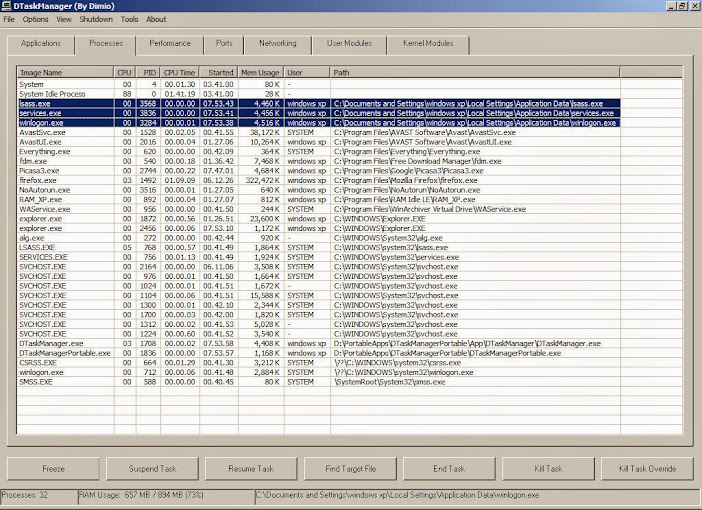
Killing the Process
  • Launch DTaskManager
  • Select Processes tab and sort the list by Path
  • Select lsass.exe, services.exe and winlogon.exe (location %APPDATA%)
  • Click End Task button

DTaskManager+%2528By+Dimio%2529.jpg


That's it, we've disabled Brontok in under a minute.

Removal of files by scanning

  • Launch Malware Destroyer,
  • Select Scan Now on the drop down menu

eO1zSe9_0Qtxx0QystkN-_k3TIMCff3E7bo1Ld07

  • Close the next dialog
  • Click Execute tab

Detected+Malware+from+Last+Scan.jpg


Now we've disabled and eliminated Brontok on your system in under 5 minutes.

If you have CCleaner, launch it and go to Tools | Startups and delete all Brontok startup entries in case we've missed something.
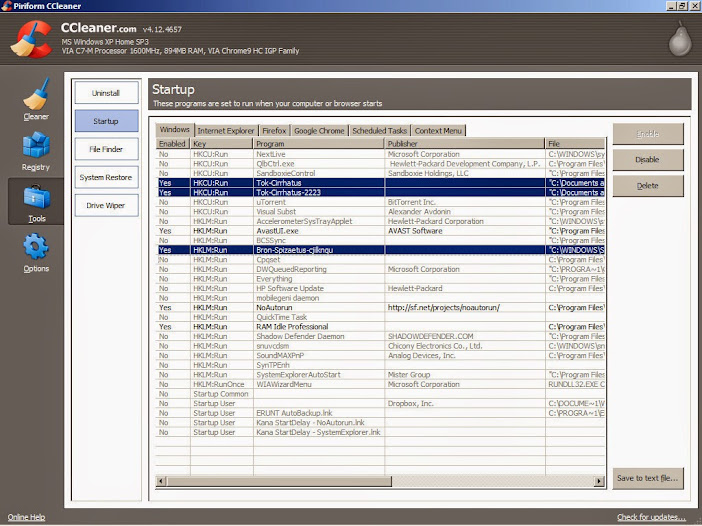
CCleaner+Brontok.jpg


Time to do a Full Scan of your system.  I suggest you use Malwarebytes.

For the removal of the other infected files in your external HDD you can perform a scan right away or wait for the third part of the tutorial.  We'll be using Explorer to remove the remaining Brontok worms plus I'll teach a quick method of deletion for Windows XP users.

How to remove Brontok in under 5 minutes Part 1

How to remove Brontok in under 5 minutes

What is brontok? 

Win32/Brontok is a family of mass-mailing e-mail worms. The worm spreads by sending a copy of itself as an e-mail attachment to e-mail addresses that it gathers from files on the infected computer. It can also copy itself to USB and pen drives. Win32/Brontok can disable antivirus and security software, immediately terminate certain applications, and cause Windows to restart immediately when certain applications run. The worm may also conduct denial of service (DoS) attacks against certain Web sites

Removal
  • Scanning using a bootable Antivirus CD
  • Performing a Boot Scan using Avast! or any AV with a similar feature
  • Manual removal using a bootable CD or USB drive (Bart PE, HBCD, UBCD, Linux, etc.)
  • Scanning with an updated Antivirus in Safe Mode
  • Manual removal in Normal Mode (less than 5 minutes)
  • etc
I'll be teaching you the 5th option.

We'll disable it first using DTaskManager (By Dimio) and do a quick scan with Malware Destroyer which can be easily accomplished in 3-5 minutes.  There are other tools available and a handful of variation in the removal process but I'll be focusing on these two.

DTaskManager (By Dimio)
EMCO Malware Destroyer

After the Brontok worm had been disabled, removal of drop files from external drives can be deleted using Explorer or by scanning


How to remove Brontok in under 5 minutes Part 2